


Overview
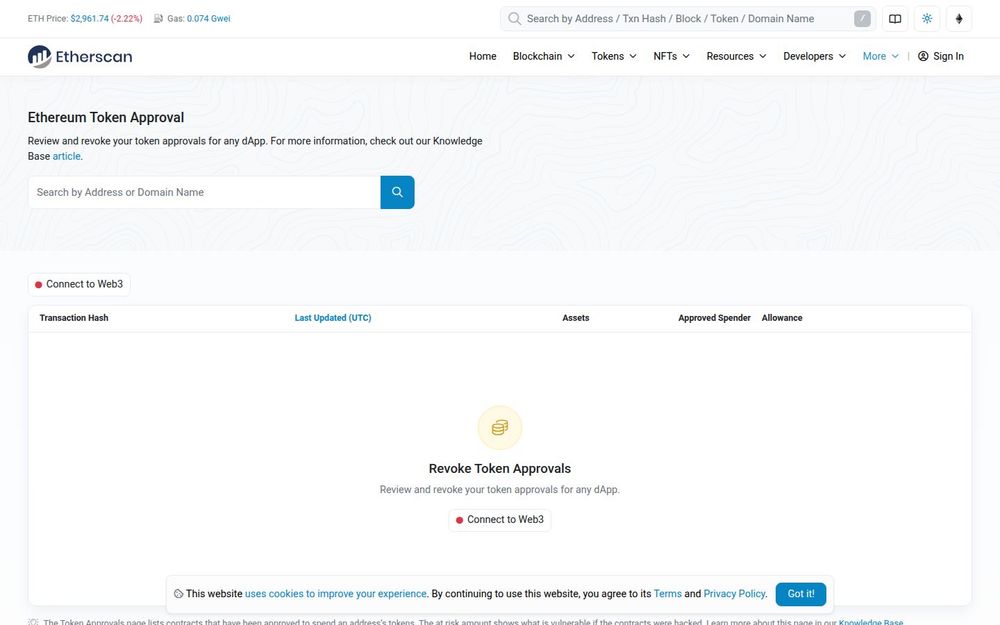
Etherscan’s Token Approval Checker is a purpose-built interface for Ethereum users to review, audit, and revoke token approvals that have been granted to smart contracts and dApps. The tool consolidates approvals across major token standards — ERC-20, ERC-721, and ERC-1155 — and displays key details such as approved spenders, allowance amounts, and token identifiers. Designed to improve on-chain security awareness, the page helps users understand which contracts are authorized to move or manage their tokens and gives practical controls to reduce risk.
Core Capabilities
-
Approval Discovery: Scan and list all contracts that have been granted permission to spend or manage tokens from a connected address, across token standards.
-
Detailed Allowance Display: Show allowance values, token IDs for NFTs, and an estimated at-risk amount representing what could be taken if an approved contract were exploited.
-
Revoke Functionality: Provide an option to revoke approvals via Web3 wallet interactions, enabling users to rescind permissions directly from the interface (note: revocation requires an on-chain transaction and gas fees).
-
Support for Multiple Token Types: Handle ERC-20, ERC-721, and ERC-1155 tokens, presenting relevant fields per standard (e.g., token ID for NFTs, numeric allowances for fungible tokens).
-
Documentation and Contextual Help: Link to Knowledge Base articles and explanatory resources so users can learn what approvals mean and follow recommended security practices.
How It Works
Users typically connect a Web3 wallet (such as MetaMask) to the Token Approval Checker. Once connected, the tool queries the blockchain to find approval records associated with that address. Results are presented as a table with columns for the approved spender contract, associated assets, allowance or token ID, and a timestamp of the last update. For each entry, users are shown the original allowance and an estimated “at-risk” value. If the user chooses to revoke an approval, the interface triggers a transaction that sets the allowance back to zero or otherwise modifies the approval state, which requires paying the appropriate gas fee.
Why Use the Token Approval Checker?
-
Protect your funds by identifying forgotten or excessive approvals that could allow third-party contracts to transfer tokens without explicit intent.
-
Reduce attack surface: revoked approvals prevent malicious actors from exploiting previously authorized contracts.
-
Gain transparency into on-chain relationships between your address and external smart contracts, especially for decentralized exchanges, NFT marketplaces, and lending platforms.
Best Practices and Recommendations
-
Review approvals regularly, especially after using new dApps or granting permissions for trades or NFT listings.
-
Revoke approvals for contracts you no longer use. For frequently used services, consider minimizing allowances rather than granting unlimited approvals.
-
Be mindful of gas costs: revoking approvals requires a transaction. Batch changes when appropriate, but prioritize high-risk approvals first.
-
Consult the linked Knowledge Base articles to understand approval semantics and the difference between unlimited allowances and one-time approvals.
Limitations and Considerations
-
The tool surfaces on-chain approvals but cannot determine off-chain authorization, custodial arrangements, or relationships not recorded in contract allowances.
-
Revocation operations require on-chain transactions and are subject to network congestion and gas fees; the tool does not absorb these costs.
-
Displayed “at-risk” estimates are based on on-chain data and may not account for token price volatility or complex multi-contract interactions.
Getting Started
- Navigate to the Token Approval Checker page on Etherscan.
- Connect your Web3 wallet and allow the site to read the connected address.
- Review listed approvals by token standard, inspect allowance values and approved spender addresses, and consult linked Knowledge Base entries for details.
- Revoke suspicious or unnecessary approvals by initiating the revoke action and confirming the transaction in your wallet.
By consolidating approval data and providing actionable revoke controls, Etherscan’s Token Approval Checker helps users regain control of token permissions and improve their on-chain security posture.


