


Overview
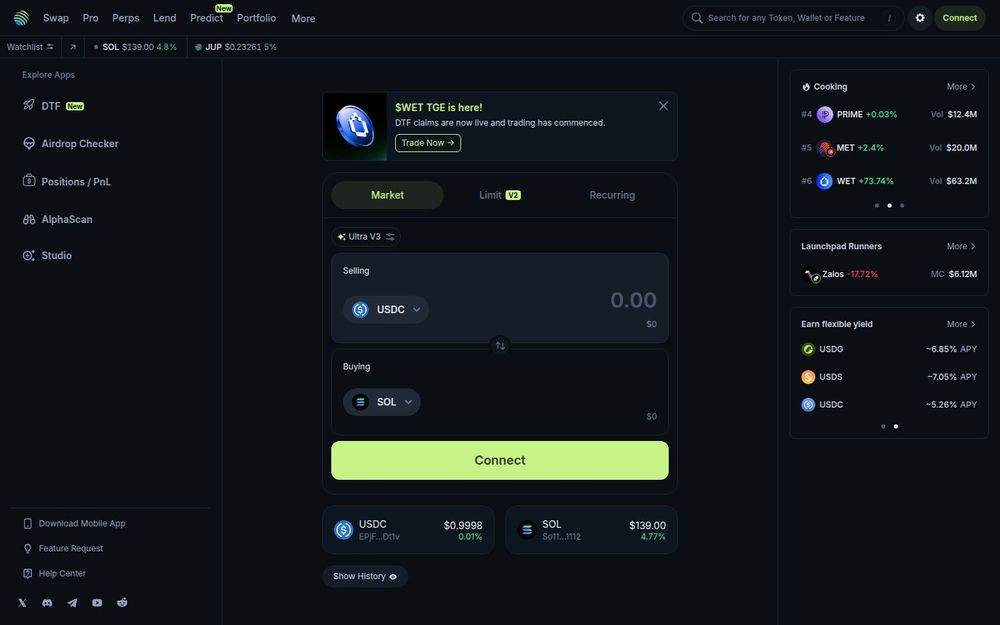
Jupiter brands itself as “The Solana Superapp,” combining multiple decentralized finance functions under a single web interface. Its homepage and navigation indicate core verticals such as Swap, Pro, Perps, Lend, Portfolio, and Prediction, making it clear the platform aims to serve both casual traders and more advanced DeFi users. Users access the platform by connecting a Solana wallet, then can perform token swaps, trade perpetuals, deposit into lending products, track investments, and explore new token launches and trending assets.
Core capabilities
-
Token Aggregation & Swaps: Jupiter provides an aggregator-style swap interface that routes trades across Solana liquidity sources to optimize price and reduce slippage. Users can execute spot trades between SOL, USDC, JUP and thousands of other SPL tokens while benefiting from routing logic that seeks the best available price.
-
Advanced Trading (Pro & Perps): The platform surfaces a Pro section and a Perps product, which suggests margin/perpetual trading and additional order types for experienced traders. Features mentioned on the site include limit orders, market orders, and recurring or scheduled trades, plus variant routing versions (V2, Ultra V3) to suit different trade strategies.
-
Lending & Yield: Jupiter presents an Earn flexible yield section where supported stablecoins and assets (e.g., USDC, USDT, EURC) show current APYs. Users can deposit assets into lending pools to earn interest, with the UI listing approximate APYs and direct links to deposit flows.
-
Portfolio & Tracking: The app provides portfolio tracking, a watchlist, and transaction history so users can monitor balances, performance, and token holdings over time. The portfolio module aggregates on-chain positions and presents quick links to token pages and price charts.
-
Launchpad & Token Discovery: Jupiter lists launchpad runners and cooking/trending token sections where users can discover new or high-momentum tokens. This includes ranked listings, market caps, volumes, and quick access to token detail pages for more information or trading.
Product highlights and UX
-
Wallet-first access: A Solana wallet connection is required to transact, with the interface showing token balances, token icons, and wallet addresses. The site’s prominent “Connect” CTA underlines this approach.
-
Multiple order modalities: The presence of labels like Market, Limit, Recurring, Ultra V3 and V2 indicates varied order and routing options, enabling both one-off swaps and scheduled or optimized executions.
-
Real-time data and discovery: Live price tiles, token rankings, and promotional banners (for examples such as token TGE announcements) make it easy to keep up with market events and discover new opportunities without leaving the app.
Security, ecosystem and integrations
Jupiter operates natively on the Solana network and integrates with the Solana token ecosystem (SPL tokens). As an aggregator and superapp, it relies on cross-protocol routing and liquidity sources; users should connect trusted wallets and review on-chain activity when granting permissions. The platform links to token pages and external metadata, showing token logos, price feeds, and market metrics to aid decision-making.
Why use Jupiter
Jupiter is recommended for users who want an all-in-one Solana experience: quick aggregated swaps, a path to more advanced trading in Pro and Perps, yield-earning deposits, and a built-in portfolio and discovery experience. Its combination of swap routing efficiency, multi-product UI, and token discovery features makes it a practical hub for both newcomers and active DeFi traders focused on the Solana ecosystem.
Getting started
To get started, connect a Solana wallet, review token prices or the watchlist, and try a small swap to experience Jupiter’s routing. From there, users can explore the Pro interface for limit and advanced orders, review lending APYs before depositing, and use portfolio tools to track holdings and performance.


